Five weeks after a scheduling workshop, the leader of a client program sent a note most executives will recognize. Measured against the workshop baseline, the program had slipped 13 calendar days in 35. The trend was concerning, and he asked for perspective on two things. First, schedule feasibility: did we establish a schedule too aggressive to realistically achieve? Second, critical path urgency: are we treating critical path activities with the urgency our commitments require, or are we becoming too accepting of slips? He added the constraint that makes the question hard: he did not want to undermine the morale behind the momentum the team had built.
Those are the right questions. And the first thing to notice is that they are questions, not conclusions. He did not declare the schedule infeasible or the team complacent. He asked, and then he went looking for evidence. That instinct is the subject of this article, because critical path analysis starts with questions, the right questions, written down before the schedule file is ever opened. The schedule is an answer machine. fastProjectAI was designed to find those answers quickly. The questions still have to come from you.
Write the questions down first
Before the analysis session, write a one-page question set and share it. Ours for that week looked like this:
The weekly question set
For the critical path:
- What is the six-week trend?
- What is happening with the near-term activities? How have they changed, and what is causing the change? Did they start on time, and if not, why?
- What external factors are influencing the near-term activities?
- What do the changed activities have in common: owner, type of task, location?
- Is this a slip, or is the real schedule emerging?
For the paths behind it:
- What is the six-week trend for CP2 and CP3?
- What is the cause of the change for CP2 and CP3?
- What external factors are influencing their near-term activities?
Then everyone answers the questions independently, before the meeting. The independent pass matters more than it looks. An analysis done alone leaves a record: the views you set up, the logic you followed, the screenshots you took, the conclusion each one supports. Done by three people separately and then compared, it finds more than any shared screen session, because more eyes on the same schedule find different things. If the group had met first and analyzed together, most of that would have been lost. And it should never be left to the program manager alone; the schedule is the team's instrument, not the scheduler's.
CP1 is the long pole
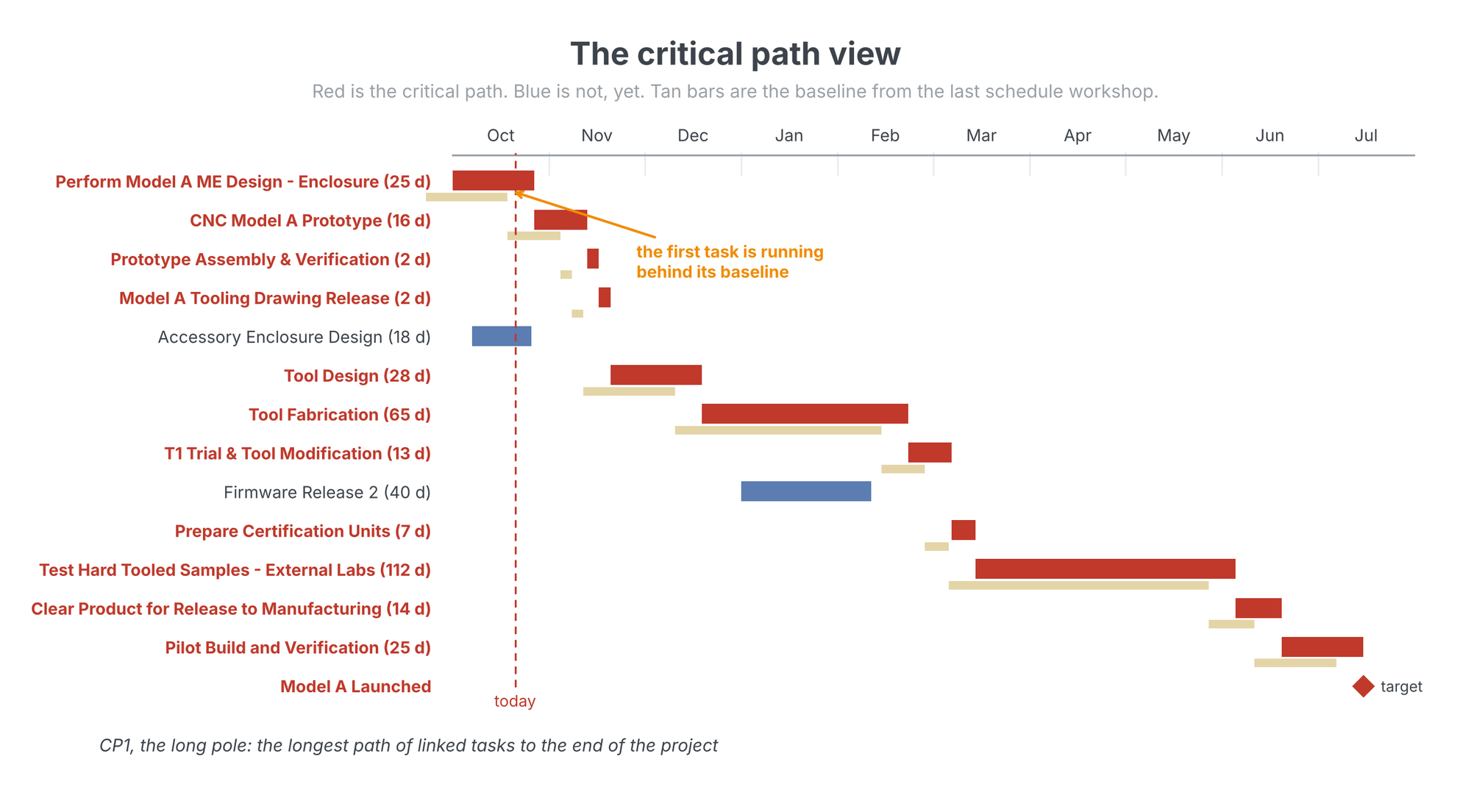
The vocabulary first. CP1 is the critical path: the longest chain of linked tasks between today and the end of the project. It is the long pole in the tent. Slip any task on it by a day and the end date moves a day; there is no buffer anywhere on it. In every view that follows, red is the critical path and blue is everything else. The tan bars are the baseline from the scheduling workshop, frozen so that every week can be compared against the same reference.
Peeling the onion
One path never tells the story. Behind CP1 sits CP2, the second-longest path to the end, and behind it CP3, and so on. We call working through them peeling the onion: peel back one layer and look at what is driving the path underneath. The arithmetic is what makes the layers matter. If CP2 ends three days behind CP1, then CP2 has three days of slack and no more. If CP2 slips four days, it is the new critical path. If CP1 pulls in four days, same result. Either way, the path you were not watching now owns your end date.
In the schedule views, every task is labeled with the path it sits on. The "2:" in front of a task name means the task is on CP2. Filter the schedule to the first five paths and the whole structure of the race is on one screen.
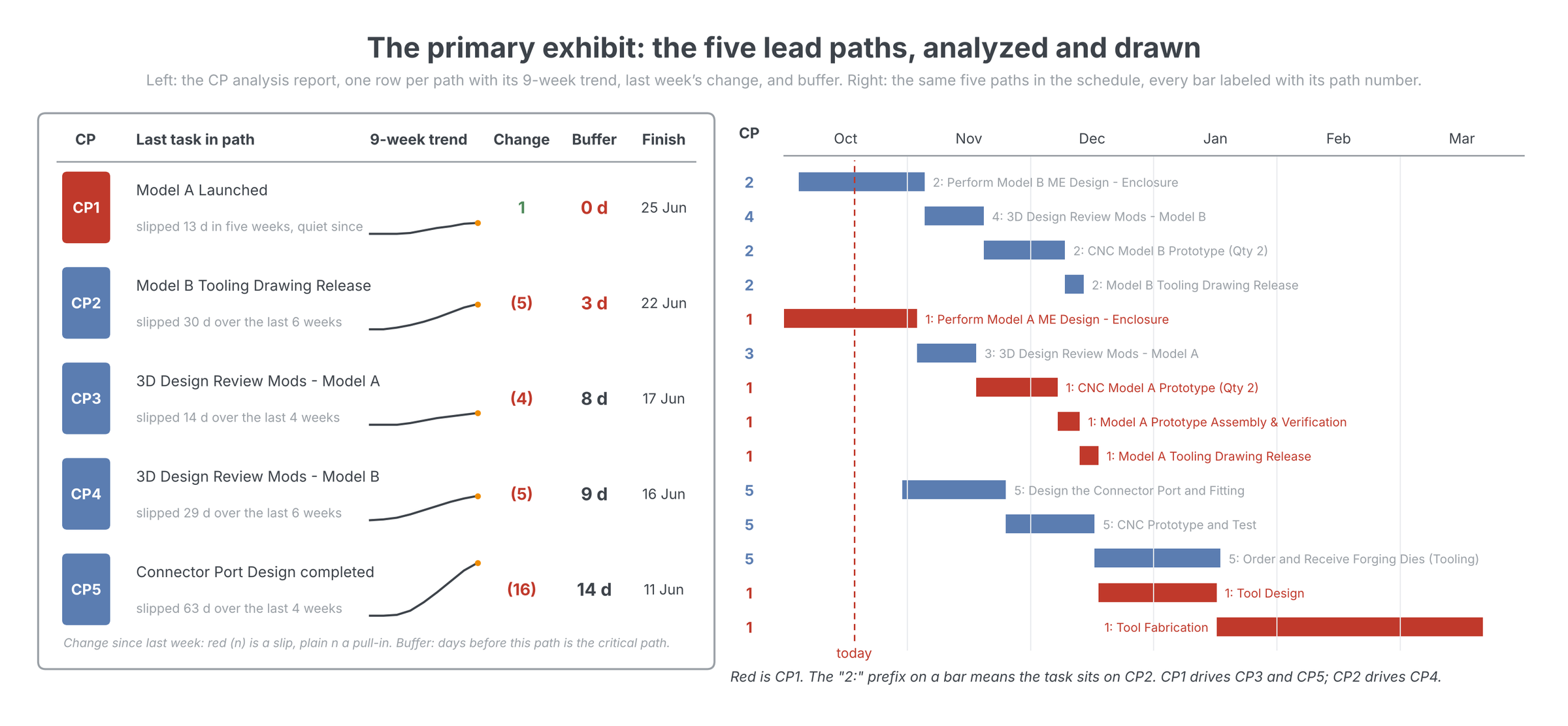
On the program in question, four of the five lead paths were slipping at once, which looks like a team-wide problem until you peel. The layers showed two causes, not four: CP1 was driving CP3 and CP5, and CP2 was driving CP4. Both drivers traced to the same area, the mechanical design of the two product variants. Four slipping paths collapsed into one conversation with one design group. That is the kind of focus the onion buys, and it is why the second or third critical path that sneaks up on you is a lateralworks obsession of long standing.
Buffer is the whole game
For each path behind CP1, the number that matters is buffer: how many days that path can slip before it hits the main critical path and becomes the constraint. The CP analysis chart puts the five paths on one axis against one target, with each path's buffer beside its trend.
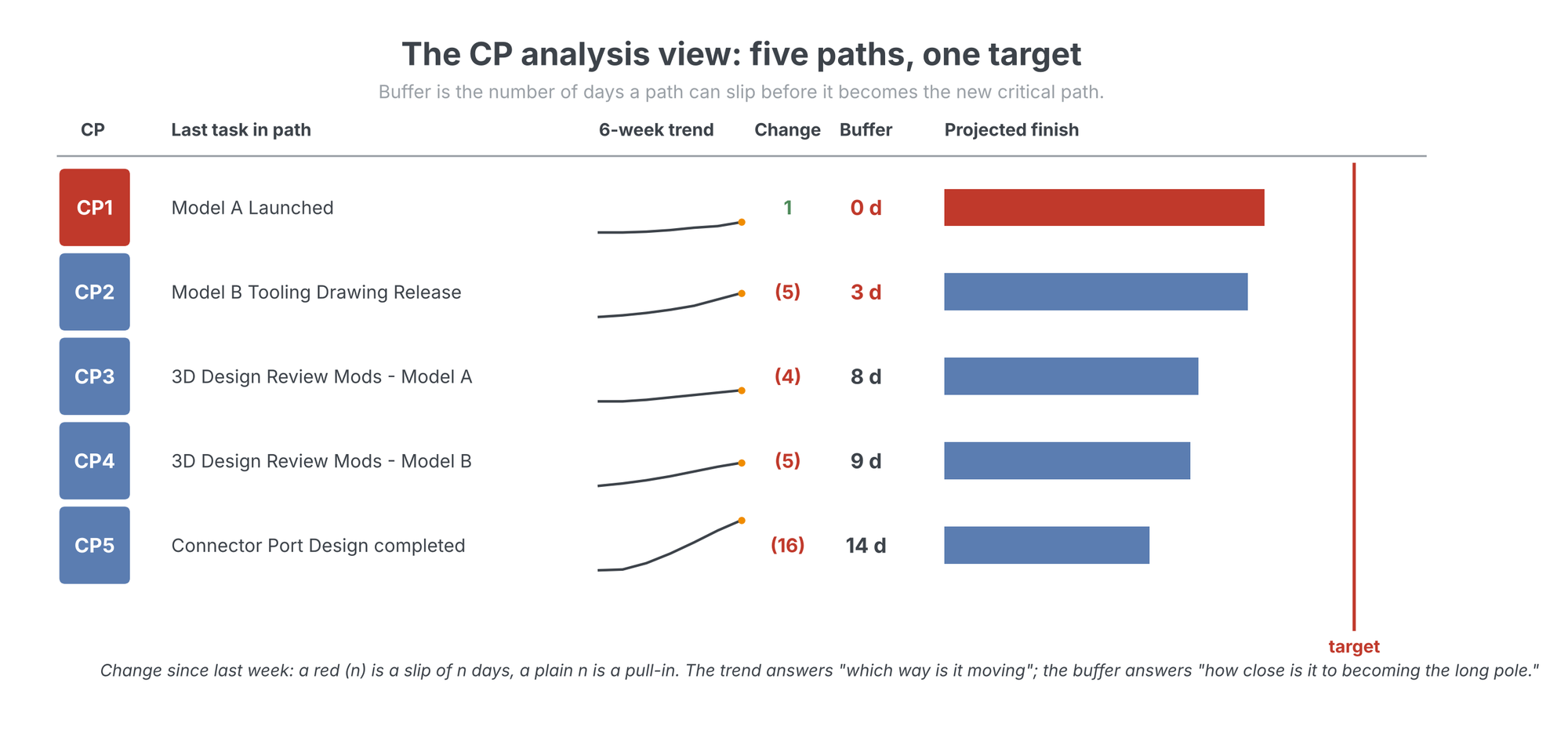
Read the two columns together, because a path loses buffer at the sum of two rates: its own slips plus the critical path's pull-ins. A path slipping five days a week with three days of buffer is days from taking over the program. A path with sixty days of buffer slipping two days a week is a note in the log. The erosion arithmetic has its own write-up in Buffer erosion, including the uncomfortable corollary: the better CP1 performs, the faster the paths behind it go critical.
Sort the paths by what they ask of you
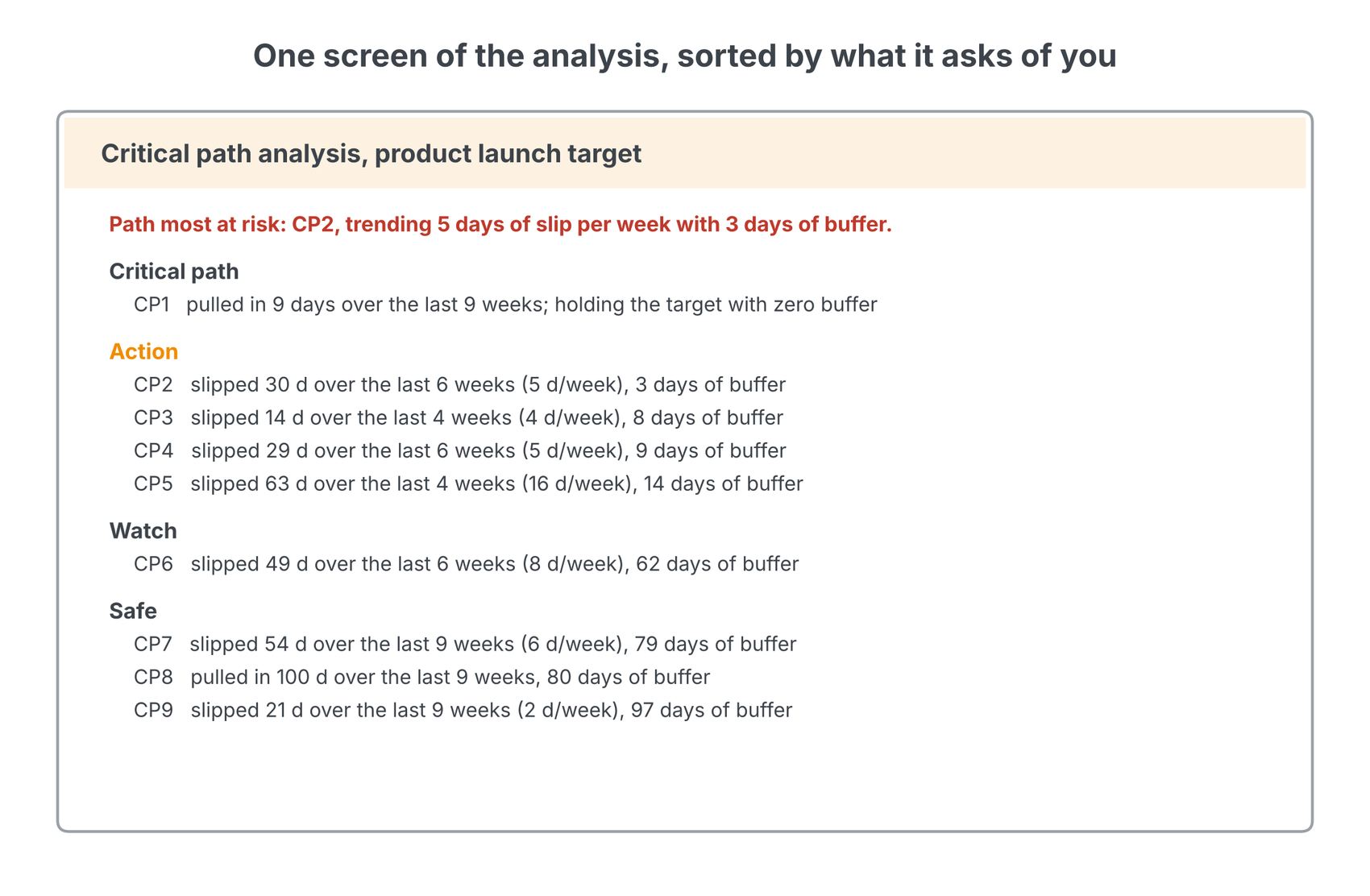
The analysis output we put in front of the team sorts every path into three tiers. Action: paths whose buffer is small against their slip rate; these get investigated this week. Watch: paths eroding but with real buffer left; these get a trend check. Safe: everything else. The sort line that week read four paths dangerously close, and that sentence did more to focus the room than any chart.
The cause of the change
Back to the leader's first question: is the schedule too aggressive? That question cannot be answered by staring at the 13-day total. It is answered by peeling the trend back week by week against the baseline and naming the cause of every change. The thing we are always looking for is the cause of the change. Are there good reasons for the delay? Is this the real schedule emerging? Were the estimates too aggressive? Is something causing the slips that you can change?
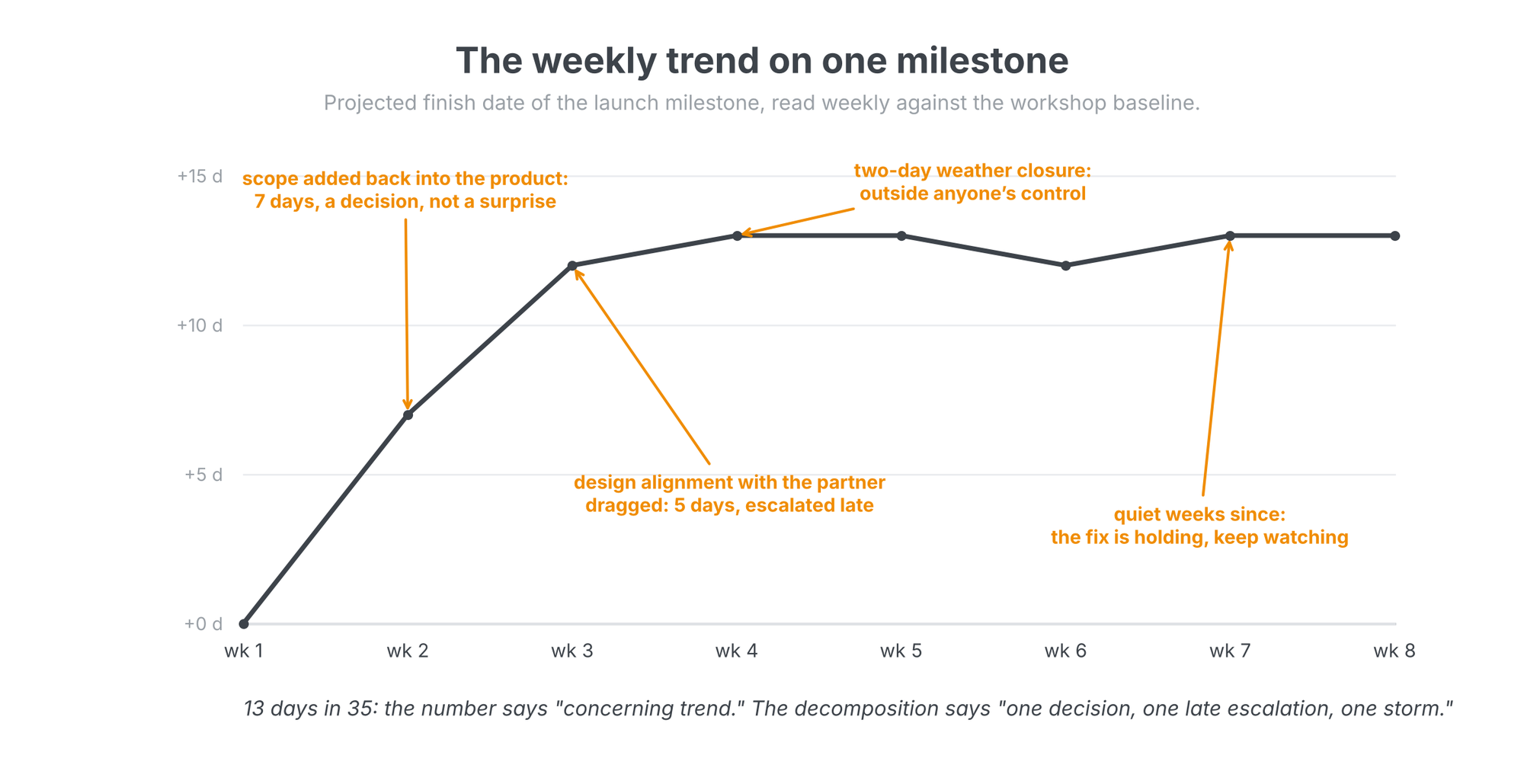
The decomposition settled the feasibility question with data instead of opinion. Seven of the thirteen days were a deliberate decision to add scope back into the product for customer value: a choice, made with open eyes, not a slip. Five days were a design alignment that dragged between the client and its manufacturing partner, where earlier escalation would have saved most of it: a process failure with a process fix. Two days were a storm that closed the partner's facility: noise. The estimates themselves were holding. The verdict was not "the schedule was too aggressive"; it was "escalate critical path blockers in days, not weeks," and the quiet weeks since the fix are the evidence it took.
Break down the near-term critical path
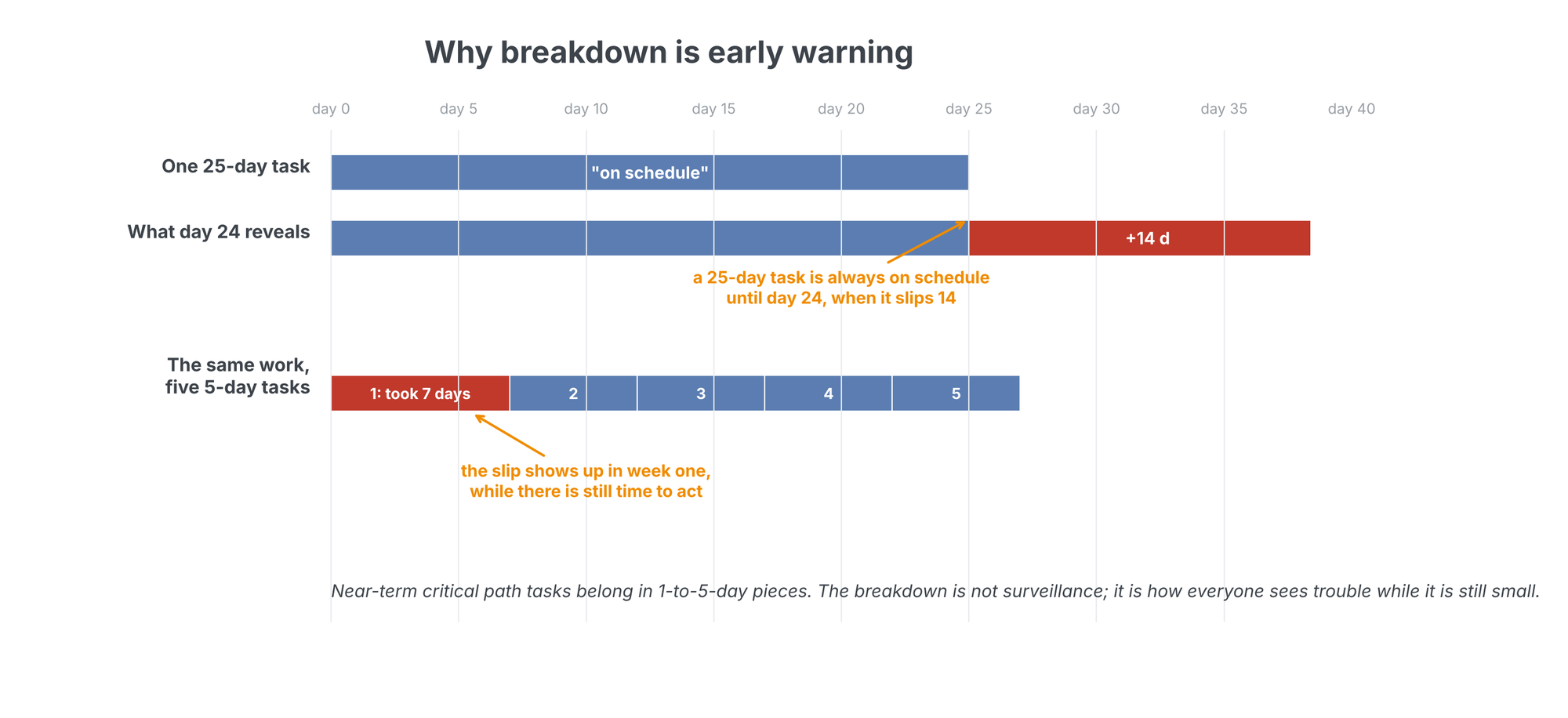
The richest thread in that week's discussion was about task size. The near-term critical path, everything on CP1 and CP2 inside the next month, should be broken into tasks of one to five days. The reason is early warning. A 25-day task is always on schedule until day 24, when it slips 14. The same work as five 5-day tasks tells you in the first week, when the first piece takes seven days, and a week-one signal leaves you twenty days to act.
Expect resistance, and read the resistance carefully. When the team first broke the 25-day task into smaller milestones, the development partner was confused by the pieces and said they were "just doing it all at once." The task went back into the schedule as a monolith. Pause on that, because the confusion itself is data. Sometimes it means the breakdown was framed poorly, and a different cut fixes it: first draft, second draft, final; or top half, bottom half, end cap. Sometimes it means the partner does not actually know what is inside those 25 days, and does not want that exposed. You cannot tell which from the outside. You can only tell by insisting on the decomposition and watching what comes back.
Ten months, lost
Another client, another program, a development partner far away. The partner resisted oversight, communicated poorly, and would not break down its 60-to-90-day tasks. We flagged the refusal itself as a leading indicator. The client preferred to trust: the partner said things were going well, and nobody wanted to look like a micromanager. When the client finally pushed once for a breakdown, the partner was "confused." Ten months later that partner was on the critical path and had caused a slip measured in months. The cause turned out to be a team that did not fully understand the design, could not ask for help without feeling exposed, and was working from thin documentation. Everything discovered in October had been askable in January. Forcing the breakdown in January would have found it. That is the cost of politeness: ten months.
So when the partner pushes back, say what breakdown is actually for. It is not surveillance, and the message cannot be "we are checking up on you." The message is: we all need visibility so we can help you, and we have to know when something slips in days, not after a month of work. Small milestones also move the accountability where it belongs; each 1-to-5-day piece is a commitment the partner makes and keeps, instead of a 25-day silence. If the relationship matters, make it the system: this is how we run schedules now, every supplier, every workstream. A system is impersonal. Scrutiny is personal. Teams accept systems.
Make it a weekly ritual
None of this works as a one-time intervention, and the worst time to learn the analysis is the week the trend turns. The pattern that sticks: the program leader and the program manager each run the analysis independently, every week, for every project. Write the questions first. Answer them from the schedule. Compare conclusions, then walk into the weekly refresh with causes instead of impressions. When the analysis finds something structural, check whether the other programs share it; the critical paths usually have more in common than the teams expect.
Then teach it. A thirty-minute session for the rest of the team: here are the questions we asked, here are the views that answered them, here is what we concluded. Teaching the analysis reinforces it in the teacher and spreads it to the people who will run it next. The goal state is cultural: everyone on the program shouting when the critical path slips, not just the leader. A slip that only worries the boss is a reporting system. A slip that worries everyone is an execution system; the difference shows up in the trend line.
The tool matters because the loop has to be fast. fastProjectAI's analysis views, the path labels, the trend inspector, the buffer chart, the peel-back against any baseline, exist so that finding the answer takes minutes. When the answer is cheap, you ask more questions, and the questions are the analysis. Write them down, answer them weekly, and the schedule stops surprising you.
Related on lateralworks: The critical path you're not watching and From the schedule to Monday morning.